系统安装
Ubuntu
U盘制作
- 准备工作
- 制作启动盘
- 写入硬盘映像
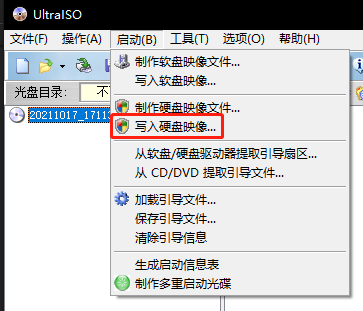
- 选择写入硬盘
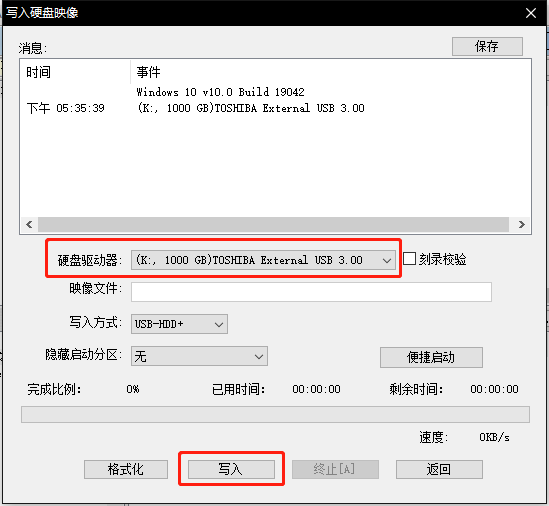
- 写入硬盘映像
LVM 磁盘
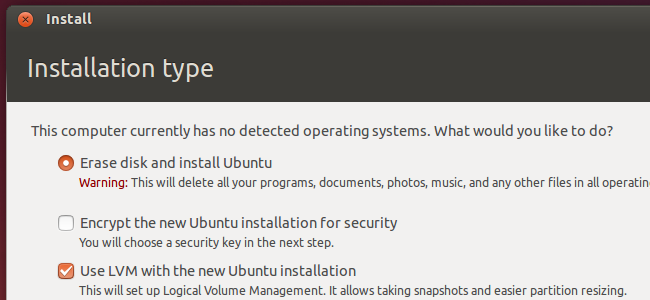
安装系统时,为便于之后维护,请使用 LVM 安装Ubuntu。
具体LVM相关 请参考本网站相关文章:LVM学习笔记。
集群搭建
基础环境
RKE
参考官方文档 部署集群
rke up
Cluster,yaml
# If you intended to deploy Kubernetes in an air-gapped environment,
# please consult the documentation on how to configure custom RKE images.
nodes:
- address: 192.168.3.101
  port: "22"
  internal_address: ""
  role:
  - controlplane
  - worker
  - etcd
  hostname_override: kubcm-001.kinson.fun
  user: root
  docker_socket: /var/run/docker.sock
  ssh_key: ""
  ssh_key_path: ~/.ssh/id_rsa
  ssh_cert: ""
  ssh_cert_path: ""
  labels: {}
  taints: []
- address: 192.168.3.102
  port: "22"
  internal_address: ""
  role:
  - worker
  hostname_override: kubwo-001.kinson.fun
  user: root
  docker_socket: /var/run/docker.sock
  ssh_key: ""
  ssh_key_path: ~/.ssh/id_rsa
  ssh_cert: ""
  ssh_cert_path: ""
  labels: {}
  taints: []
- address: 192.168.3.103
  port: "22"
  internal_address: ""
  role:
  - worker
  hostname_override: kubwo-002.kinson.fun
  user: root
  docker_socket: /var/run/docker.sock
  ssh_key: ""
  ssh_key_path: ~/.ssh/id_rsa
  ssh_cert: ""
  ssh_cert_path: ""
  labels: {}
  taints: []
services:
  etcd:
    image: ""
    extra_args: {}
    extra_args_array: {}
    extra_binds: []
    extra_env: []
    win_extra_args: {}
    win_extra_args_array: {}
    win_extra_binds: []
    win_extra_env: []
    external_urls: []
    ca_cert: ""
    cert: ""
    key: ""
    path: ""
    uid: 0
    gid: 0
    snapshot: null
    retention: ""
    creation: ""
    backup_config: null
  kube-api:
    image: ""
    extra_args: {}
    extra_args_array: {}
    extra_binds: []
    extra_env: []
    win_extra_args: {}
    win_extra_args_array: {}
    win_extra_binds: []
    win_extra_env: []
    service_cluster_ip_range: 10.43.0.0/16
    service_node_port_range: ""
    pod_security_policy: false
    pod_security_configuration: ""
    always_pull_images: false
    secrets_encryption_config: null
    audit_log: null
    admission_configuration: null
    event_rate_limit: null
  kube-controller:
    image: ""
    extra_args: {}
    extra_args_array: {}
    extra_binds: []
    extra_env: []
    win_extra_args: {}
    win_extra_args_array: {}
    win_extra_binds: []
    win_extra_env: []
    cluster_cidr: 10.42.0.0/16
    service_cluster_ip_range: 10.43.0.0/16
  scheduler:
    image: ""
    extra_args: {}
    extra_args_array: {}
    extra_binds: []
    extra_env: []
    win_extra_args: {}
    win_extra_args_array: {}
    win_extra_binds: []
    win_extra_env: []
  kubelet:
    image: ""
    extra_args: {}
    extra_args_array: {}
    extra_binds: []
    extra_env: []
    win_extra_args: {}
    win_extra_args_array: {}
    win_extra_binds: []
    win_extra_env: []
    cluster_domain: cluster.local
    infra_container_image: ""
    cluster_dns_server: 10.43.0.10
    fail_swap_on: false
    generate_serving_certificate: false
  kubeproxy:
    image: ""
    extra_args: {}
    extra_args_array: {}
    extra_binds: []
    extra_env: []
    win_extra_args: {}
    win_extra_args_array: {}
    win_extra_binds: []
    win_extra_env: []
network:
  plugin: calico
  options: {}
  mtu: 0
  node_selector: {}
  update_strategy: null
  tolerations: []
authentication:
  strategy: x509
  sans: []
  webhook: null
addons: ""
addons_include: []
system_images:
  etcd: registry.kinson.fun/rancher/mirrored-coreos-etcd:v3.5.10
  alpine: registry.kinson.fun/rancher/rke-tools:v0.1.96
  nginx_proxy: registry.kinson.fun/rancher/rke-tools:v0.1.96
  cert_downloader: registry.kinson.fun/rancher/rke-tools:v0.1.96
  kubernetes_services_sidecar: registry.kinson.fun/rancher/rke-tools:v0.1.96
  kubedns: registry.kinson.fun/rancher/mirrored-k8s-dns-kube-dns:1.22.28
  dnsmasq: registry.kinson.fun/rancher/mirrored-k8s-dns-dnsmasq-nanny:1.22.28
  kubedns_sidecar: registry.kinson.fun/rancher/mirrored-k8s-dns-sidecar:1.22.28
  kubedns_autoscaler: registry.kinson.fun/rancher/mirrored-cluster-proportional-autoscaler:v1.8.9
  coredns: registry.kinson.fun/rancher/mirrored-coredns-coredns:1.10.1
  coredns_autoscaler: registry.kinson.fun/rancher/mirrored-cluster-proportional-autoscaler:v1.8.9
  nodelocal: registry.kinson.fun/rancher/mirrored-k8s-dns-node-cache:1.22.28
  kubernetes: registry.kinson.fun/rancher/hyperkube:v1.28.9-rancher1
  flannel: registry.kinson.fun/rancher/mirrored-flannel-flannel:v0.24.2
  flannel_cni: registry.kinson.fun/rancher/flannel-cni:v0.3.0-rancher9
  calico_node: registry.kinson.fun/rancher/mirrored-calico-node:v3.27.0
  calico_cni: registry.kinson.fun/rancher/calico-cni:v3.27.0-rancher1
  calico_controllers: registry.kinson.fun/rancher/mirrored-calico-kube-controllers:v3.27.0
  calico_ctl: registry.kinson.fun/rancher/mirrored-calico-ctl:v3.27.0
  calico_flexvol: registry.kinson.fun/rancher/mirrored-calico-pod2daemon-flexvol:v3.27.0
  canal_node: registry.kinson.fun/rancher/mirrored-calico-node:v3.27.0
  canal_cni: registry.kinson.fun/rancher/calico-cni:v3.27.0-rancher1
  canal_controllers: registry.kinson.fun/rancher/mirrored-calico-kube-controllers:v3.27.0
  canal_flannel: registry.kinson.fun/rancher/mirrored-flannel-flannel:v0.24.2
  canal_flexvol: registry.kinson.fun/rancher/mirrored-calico-pod2daemon-flexvol:v3.27.0
  weave_node: registry.kinson.fun/weaveworks/weave-kube:2.8.1
  weave_cni: registry.kinson.fun/weaveworks/weave-npc:2.8.1
  pod_infra_container: registry.kinson.fun/rancher/mirrored-pause:3.7
  ingress: registry.kinson.fun/rancher/nginx-ingress-controller:nginx-1.9.6-rancher1
  ingress_backend: registry.kinson.fun/rancher/mirrored-nginx-ingress-controller-defaultbackend:1.5-rancher1
  ingress_webhook: registry.kinson.fun/rancher/mirrored-ingress-nginx-kube-webhook-certgen:v20231226-1a7112e06
  metrics_server: registry.kinson.fun/rancher/mirrored-metrics-server:v0.7.0
  windows_pod_infra_container: registry.kinson.fun/rancher/mirrored-pause:3.7
  aci_cni_deploy_container: registry.kinson.fun/noiro/cnideploy:6.0.4.1.81c2369
  aci_host_container: registry.kinson.fun/noiro/aci-containers-host:6.0.4.1.81c2369
  aci_opflex_container: registry.kinson.fun/noiro/opflex:6.0.4.1.81c2369
  aci_mcast_container: registry.kinson.fun/noiro/opflex:6.0.4.1.81c2369
  aci_ovs_container: registry.kinson.fun/noiro/openvswitch:6.0.4.1.81c2369
  aci_controller_container: registry.kinson.fun/noiro/aci-containers-controller:6.0.4.1.81c2369
  aci_gbp_server_container: ""
  aci_opflex_server_container: ""
ssh_key_path: ~/.ssh/id_rsa
ssh_cert_path: ""
ssh_agent_auth: false
authorization:
  mode: rbac
  options: {}
ignore_docker_version: null
enable_cri_dockerd: null
kubernetes_version: ""
private_registries:
  - url: registry.kinson.fun
    is_default: true
ingress:
  provider: ""
  options: {}
  node_selector: {}
  extra_args: {}
  dns_policy: ""
  extra_envs: []
  extra_volumes: []
  extra_volume_mounts: []
  update_strategy: null
  http_port: 0
  https_port: 0
  network_mode: ""
  tolerations: []
  default_backend: null
  default_http_backend_priority_class_name: ""
  nginx_ingress_controller_priority_class_name: ""
  default_ingress_class: null
cluster_name: ""
cloud_provider:
  name: ""
prefix_path: ""
win_prefix_path: ""
addon_job_timeout: 0
bastion_host:
  address: ""
  port: ""
  user: ""
  ssh_key: ""
  ssh_key_path: ""
  ssh_cert: ""
  ssh_cert_path: ""
  ignore_proxy_env_vars: false
monitoring:
  provider: ""
  options: {}
  node_selector: {}
  update_strategy: null
  replicas: null
  tolerations: []
  metrics_server_priority_class_name: ""
restore:
  restore: false
  snapshot_name: ""
rotate_encryption_key: false
dns: null
Helm
curl https://baltocdn.com/helm/signing.asc | sudo apt-key add -
sudo apt-get install apt-transport-https --yes
echo "deb https://baltocdn.com/helm/stable/debian/ all main" | sudo tee /etc/apt/sources.list.d/helm-stable-debian.list
sudo apt-get update
sudo apt-get install helm
Rancher
helm repo add rancher-latest https://releases.rancher.com/server-charts/latest
help repo update
helm install rancher rancher-latest/rancher \
  --create-namespace \
  --namespace cattle-system \
  --set hostname=rancher.kinson.fun \
  --set rancherImage=registry.kinson.fun/rancher/rancher \
  --set systemDefaultRegistry=registry.kinson.fun \
  --set bootstrapPassword=lqs4568349 \
  --set tls=external
longhorn
依赖
apt-get install open-iscsi jq curl util-linux nfs-common -y安装
使用Rancher App 安装,当然,也可以通过 Helm 来创建
Cert Manager
安装
helm repo add cert-manager https://charts.jetstack.io
helm install cert-manager cert-manager/cert-manager -n cert-manager --create-namespace \
  --set crds.enabled=true \
  --set "approveSignerNames={issuers.cert-manager.io/*,clusterissuers.cert-manager.io/*,kubernetes.io/*}" \
  --set image.repository=registry.kinson.fun/jetstack/cert-manager-controller \
  --set webhook.image.repository=registry.kinson.fun/jetstack/cert-manager-webhook \
  --set cainjector.image.repository=registry.kinson.fun/jetstack/cert-manager-cainjector \
  --set acmesolver.image.repository=registry.kinson.fun/jetstack/cert-manager-acmesolver \
  --set startupapicheck.image.repository=registry.kinson.fun/jetstack/cert-manager-startupapicheck
Minio Operator
安装
参考文档
helm install minio-operator minio-operator/operator -n minio-operator   --create-namespace \
  --set operator.image.repository="registry.kinson.fun/minio/operator" \
  --set console.image.repository="registry.kinson.fun/minio/operator"
Tekton
Tekton,谷歌是你爹是吧?gcr的镜像一环套一环……
搜了一下发现,还真TM是……
安装
kubectl apply -f https://storage.googleapis.com/tekton-releases/operator/latest/release.yamlApply 前,要将所有gcr地址改成私有仓库地址
注意:Apply之后需要更改 CRD:TektonInstallerSets 中的所有镜像配置为私有仓库的地址。
Kubevela
helm install kubevela kubevela/vela-core \
  --create-namespace \
  --namespace vela-system \
  --set imageRegistry="registry.kinson.fun/" \
  --wait
Argo CD
安装
helm repo add argo https://argoproj.github.io/argo-helm
helm repo update
helm install argo-cd argo/argo-cd --version 7.3.4 -n argo-cd --create-namespace \
  --set global.domain="argo-cd.kinson.fun" \
  --set global.image.repository="registry.kinson.fun/argoproj/argocd" \
  --set dex.image.repository="registry.kinson.fun/dexidp/dex" \
  --set redis.enabled="false"
默认密码
kubectl -n argo-cd get secret argocd-initial-admin-secret -o jsonpath=”{.data.password}” | base64 -d
Nextcloud
helm install nextcloud nextcloud/nextcloud
–create-namespace
–namespace nextcloud
–set image.repository=”registry.kinson.fun/nextcloud”
–set nextcloud.host=”nextcloud.kinson.fun”
–set nextcloud.password=”password”
Argo-Workflow
安装
helm repo add argo https://argoproj.github.io/argo-helm
helm install argo-workflows argo/argo-workflows \
  --version 0.42.1 \
  --namespace argo \
  --create-namespace \
  --set workflow.serviceAccount.create="true" \
  --set controller.image.registry="registry.kinson.fun" \
  --set server.image.registry="registry.kinson.fun" \
  --set executor.image.registry="registry.kinson.fun" \
  --set singleNamespace="true"
Argo-Events
安装
helm repo add argo https://argoproj.github.io/argo-helm
helm install argo-events argo/argo-events \
  --namespace argo \
  --create-namespace \
  --set global.image.repository="registry.kinson.fun/argoproj/argo-events" \
  --set configs.jetstream.versions[0].natsImage="registry.kinson.fun/nats:2.10.10" \
  --set configs.jetstream.versions[0].metricsExporterImage="registry.kinson.fun/natsio/prometheus-nats-exporter:0.14.0" \
  --set configs.jetstream.versions[0].configReloaderImage="registry.kinson.fun/natsio/nats-server-config-reloader:0.14.0"